ONLINE
ONLIVE
Hvad sker der, når du byder på en ONLINE-auktion?

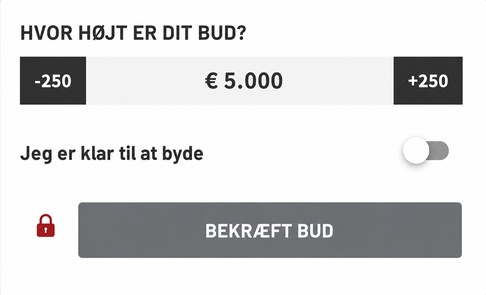
I den første budgivningsfase af auktionen kan der afgives direkte bud eller automatiske bud over et eller flere budtrin. Det betyder, at du kan indstille størrelsen på dit bud for den respektive hest eller det respektive føl og derefter beslutte, om du vil afgive dit bud som et "Direkte bud" eller som et "Automatisk bud". Hvis du ikke foretager nogen ændringer i budværktøjet under budgivningen, er systemet som standard indstillet til, at du blot foretager det næst mulige budtrin. Dette giver dig dog kun mulighed for at placere et "Direkte bud". For at kunne afgive et "Automatisk bud" skal der indtastes mindst to budtrin. Den tilsvarende pris vises direkte i visningen.
Et automatisk bud sørger for, at dit bud automatisk forhøjes med det næste minimale budtrin, så snart der indkommer et andet bud. Dette fortsætter, indtil dit fastsatte maksimumbeløb er nået.

Størrelsen på budtrinnene (i det følgende kaldet trinbredde) kan variere afhængigt af auktionen og budprisen. Trinbredden for det respektive lot ser du, når du trykker på (+) for at byde mere og (-) for at byde mindre.
Eksempel føl:
Budtrinnene stiger op til en budpris på 10.000,- EUR med hver 250,- EUR, fra en budpris på over 10.000,- EUR med hver 500,- EUR og fra en budpris på 25.000,- EUR med 1.000,- EUR.
Eksempel rideheste:
Budtrinnene stiger op til en budpris på 10.000,- EUR med hver 250,- EUR, fra en budpris på over 10.000,- EUR med hver 500,- EUR, fra en budpris på 75.000,- EUR med 1.000,- EUR og fra en budpris på 200.000,- EUR med 5.000,- EUR.
Indkommende bud prioriteres strengt efter deres tidsmæssige indgang. Hvis dit bud svarer til to eller flere identiske bud, gælder det bud, der indkom først, som det bud, der i sidste ende får hammerslaget.
Hvis der afgives et bud, der ligger en eller flere trinbredder over det nuværende bud, ændres både det nuværende bud og alle tidligere indkomne konkurrerende bud. Med andre ord, hvis det nuværende bud er 10.000,- EUR og der indkommer et maksimalbud på 15.000,- EUR, stiger det nuværende bud til 10.500,- EUR (dvs. én trinbredde højere end 10.000,- EUR). Hvis der allerede foreligger et konkurrerende maksimalbud på 12.000,- EUR, stiger det nuværende bud til 12.500,- EUR - dvs. én trinbredde over 12.000,- EUR.
Du har også mulighed for at afgive et højere bud over flere trinbredder ved at klikke på „Direkte bud". Det af dig valgte beløb bydes derefter øjeblikkeligt og synligt for dette lot.

Når du har afgivet et bud, modtager du en e-mail med bekræftelse af størrelsen på dit bud. Så snart dit højeste bud er blevet overbуdt, modtager du endnu en e-mail, hvori du bliver informeret om, at du er blevet overbуdt. Via følgende link i din e-mail kommer du direkte til det pågældende lot og kan byde igen.

Starttidspunktet for finalens online auktion (Bid Up) vises via en nedtælling over hele auktionsperioden i den øverste del af hjemmesiden. Når tiden stopper ved 00 dage 00:00:00, starter det såkaldte Bid Up automatisk. Afslutningen af hvert lot forskydes i overensstemmelse med auktionsvilkårene med henholdsvis 3 eller 5 minutter efter det foregående lot.
Eksempel (nedtælling tidtager 3 minutter):
Starter Bid Up med lot 1 kl. 20:00, er starttidspunktet for lot 2 kl. 20:03. I de sidste 3 minutter før den endelige afslutning af auktionen for et lot forlænger enhver budaktivitet nedtællingens tidtager med yderligere 3 minutter. Med andre ord: afgives der et bud, når der kun er 35 sekunder tilbage, sættes tidtageren til 3 minutter og 00 sekunder. Indkommer der i denne periode ikke yderligere bud, afsluttes auktionen og hammerslags prisen vises på budtavlen. En forlængelse af afslutningstidspunktet for et foregående lot medfører ikke en forlængelse for det efterfølgende lot.
Når du klikker på "Byd nu", åbner der sig et popup-vindue
De forskellige parametre i det efterfølgende eksempel kan ændre sig for individuelle heste og auktioner.
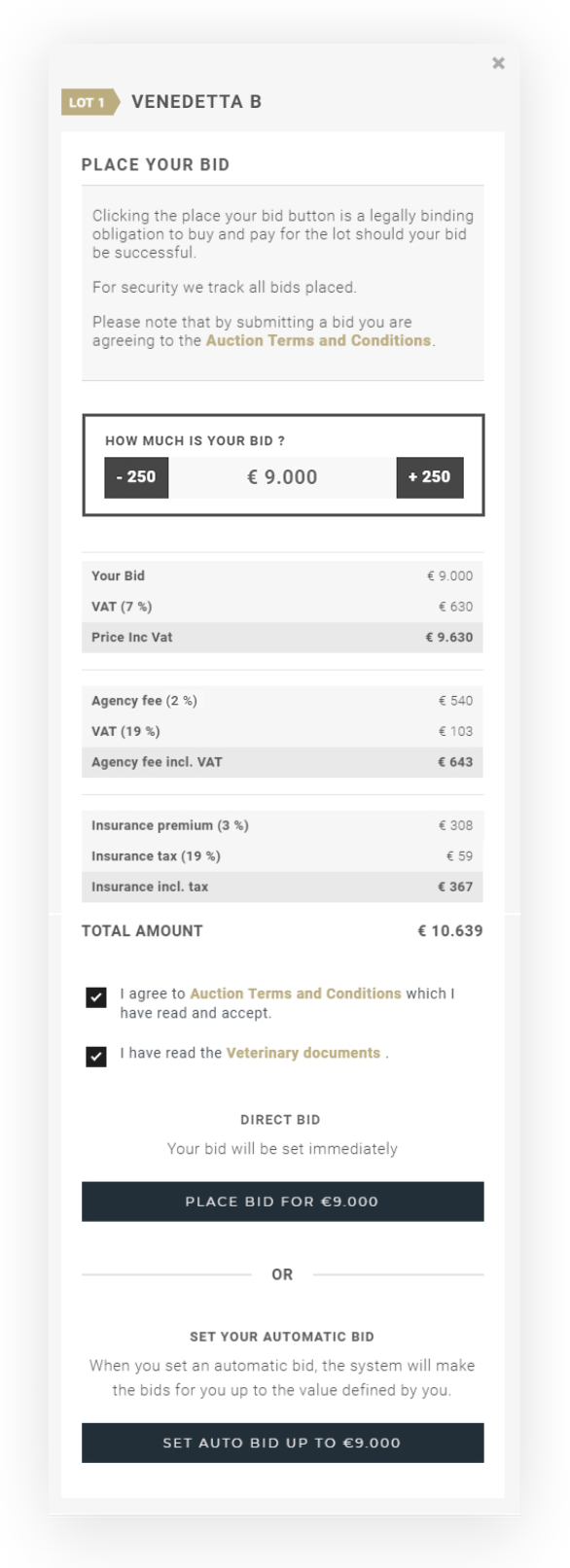
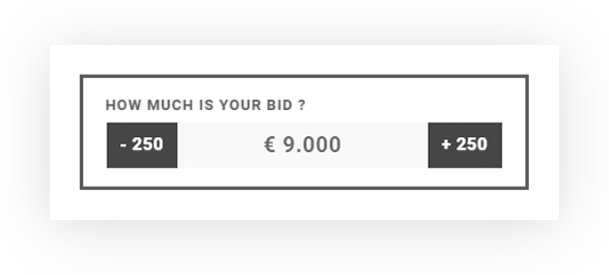
Indstil det beløb, du ønsker at byde, ved at klikke på sideknapperne. For at byde mere (+) og for at byde mindre (-).
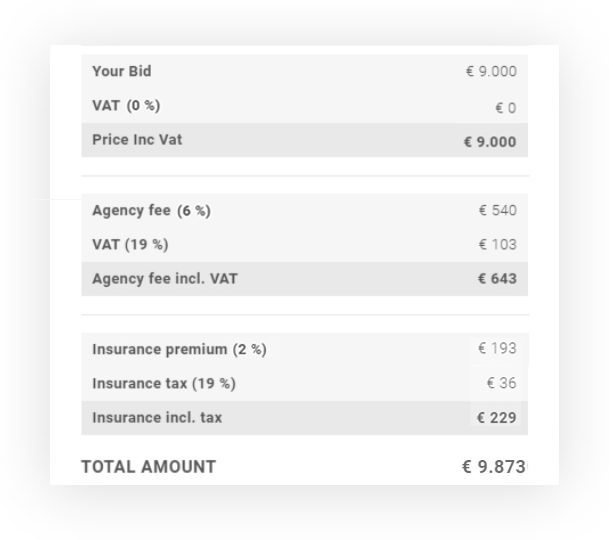
Her kan du præcist se, hvilke gebyrer der vil blive opkrævet, og det samlede beløb du skal betale, hvis du får hammerslaget for dette lot.
Når du klikker på Afgiv bud, afgives et direkte bud med det ovenfor valgte beløb.
Et automatisk bud sørger for, at dit bud automatisk forhøjes med det næste minimale budtrin, så snart der indkommer et andet bud. Dette fortsætter, indtil dit fastsatte maksimumbeløb er nået.
Hvad sker der, når du deltager i en ONLIVE-auktion?
Ud over vores
Vigtige forskelle fra ONLINE -auktioner
Ingen bud på auktionslistesiden: Online-bydere kan ikke afgive bud direkte fra lot-oversigtssiden. For at deltage skal du gå ind iONLIVE -auktionens bidvindue.Ingen automatisk budgivning med maksimalbud: I modsætning tilONLINE -auktioner kan du ved enONLIVE -auktion kun afgive manuelle bud. Hvert bud skal indtastes enkeltvis.Du skal acceptere auktionsvilkårene, før du kan gå ind i livestreamen: Det første, du ser, når du træder ind i auktionsrummet med livestream, er et popup med auktionsvilkårene. Læs dem venligst grundigt og beslut, om du accepterer dem. Først derefter får du adgang til auktionsrummet og muligheden for at afgive bud.
Online-deltagere følger live-auktionen via stream og afgiver deres bud direkte via budværktøjet.
Hvert bud sendes øjeblikkeligt til auktionæren og vises på budtavlen, sammen med buddene fra deltagerne i auktionssalen.
Størrelsen på budtrinnene (herefter kaldet trinstørrelse) kan variere afhængigt af auktionen og budprisen.
Du kan se det respektive budtrin for et lot, når du klikker på „+" for at byde højere eller på „–" for at byde lavere.
Eksempel føl:
Budtrinnene er op til en budpris på 10.000 EUR hver 250 EUR,
fra mere end 10.000 EUR hver 500 EUR og fra 25.000 EUR hver 1.000 EUR.
Eksempel rideheste:
Budtrinnene er op til en budpris på 10.000 EUR hver 250 EUR,
fra mere end 10.000 EUR hver 500 EUR og fra 75.000 EUR hver 1.000 EUR.
Fra en budpris på 200.000 EUR stiger budtrinnene til 5.000 EUR.
Eksempel rideheste:
Budtrinnene er op til en budpris på 10.000 EUR hver 250 EUR,
fra mere end 10.000 EUR hver 500 EUR og fra 25.000 EUR hver 1.000 EUR.
Fra en budpris på 200.000 EUR stiger budtrinnene til 5.000 EUR.
Indkomne bud behandles strengt efter den rækkefølge, de er modtaget – uanset om de er afgivet online eller på stedet. Hvis der ved hammerslaget foreligger to eller flere identiske bud, gives hammerslaget til det bud, der blev afgivet først.
Når du afgiver et bud, modtager du ingen e-mailbekræftelse. I grænsefladen vises det tydeligt, at du er højestbydende. Hvis du bliver overbуdt, ser du dette øjeblikkeligt i realtid på din budtavle. Når du har vundet et lot, modtager du en e-mail som bekræftelse.
Ved en
Hvis der ikke afgives yderligere bud, begynder auktionæren med det endelige opråb og lukker lottet, hvormed salget er afsluttet.
ONLIVE
Rum
Når du kommer til auktionssiden, ser du streaming-videoen og en knap til deltagelse i vores
På auktionssiden kan du kun se lottene og åbne deres detaljer, men ikke byde. Dette er udelukkende muligt i
Budtavle
Mobil
Budtavlen ved en
Hvis du bruger en mobil enhed, ser du knappen
Desktop
Hvis du bruger en desktop, ser du knappen